EAN-13: find the digit that prevents generation
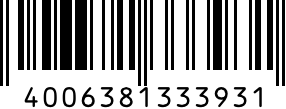
A retail-style barcode is not a free-form label. We passed a 12-digit example, its complete 13-digit form, and a wrong check digit through the Apps24 generator. Download the actual successful PNG below.
Input and result
400638133393 | 4006381333931 | PNG |
4006381333931 | 4006381333931 | same PNG |
4006381333932 | ean_checksum | no PNG |
ABC | ean_digits | no PNG |
What the result means
400638133393 and 4006381333931 produced identical PNGs. The weighted sum of the first 12 digits is 89, so the check digit is (10 − 89 mod 10) mod 10 = 1. Ending the number in 2 returned ean_checksum instead of an image. Code128 is a different choice for labels containing letters.
What to do next
1. Choose EAN-13 only for a numeric identifier. 2. Enter its 12-digit body or verify the supplied 13th digit; do not randomly change a real product identifier to bypass an error. 3. Download without cropping the margins. 4. Test the final print with the intended scanner. For an internal alphanumeric ID, consider Code128 instead.
Use the toolLimits and test conditions
Checked against the local Apps24 API on 2026-10-28: PNG 286×109, 5,284 bytes, bwip-js at the locked project version. This is a public test number, not a product registration or proof of ownership. We verified encoding and validation, not physical printing or scanner performance.
workflow-results.jsonReferences
Apps24 checks examples against the implementation and regression tests. Browser experiments state their conditions; they do not certify every device. Report an error with the page URL, input, expected result and browser. Never send passwords, private documents or personal data.